
There are a number of rules that control the process of importing data via a CSV file:
Address Validation
Building address is always required, so the connector can either map to an existing building or create a new one. The building address is validated by an address validation service that automatically finds the latitude and longitude based on the address. If the address validation cannot find a longitude and latitude with the provided address, the import may fail at this step or automatically change the address to a valid one. Read more: When should I disable address validation?
RefIds
Each entity requires a RefId. The RefId should be unique within the scope of the imported sheet.
Import validation will not let you re-use the same RefId on different entities in a single upload. If you re-use the same RefId for different entities across multiple uploads, validation will not detect if but those entities will merge. To avoid undesired merges, use unique RefIds across all entities imported.
The RefId will be added to the entity as an External Identity value. In the Advanced Config, if you select to add an org-scoped identities to a Building, Floor, Space, Zone, Thing or Point, keep in mind that these entities will merge with any other entity that shares that same identity scoped to the org-level. Read more on Identities at Mapped.
Hierarchy
The data follows a hierarchy of requirements: Point requires a Thing, Thing requires a Space or a Floor, Space requires a Floor.
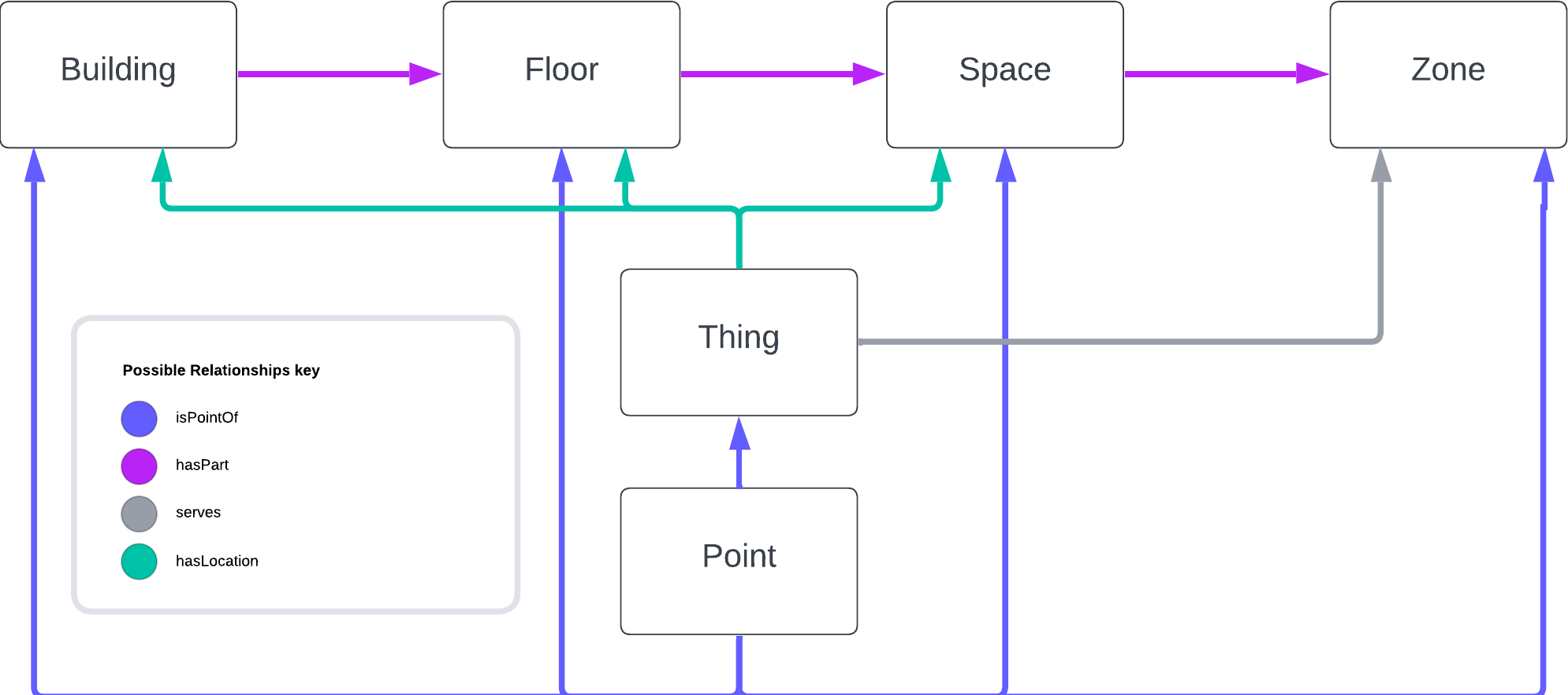
Relationships
- A Thing can only have one location, so it can only be mapped to one Space, one Floor, or one Building.
- A Space can only be mapped to one Floor.
- A Floor cannot be mapped to more than one Building.
Values
- A Point requires both a Point Value and a Point Timestamp, if it has either.
- Floor Level and Point Value must be a valid number; we do not currently support other types for Point Values.
Other Considerations
- Larger datasets may be cumbersome for the connector - if your CSV contains over 500 unique devices, consider breaking it up into multiple import files.
- After you submit your CSV, our system will import the data in the background. You are free to return to the Mapped Console after submission, and can see the data populate via the Explorer Grid View.